
Cash flow forecast
Tap the Cash Flow Forecast card on Home to see your checking and savings balance projected day by day, with bills and paychecks marked. The forecast looks 30 days ahead on the trial and Bussin, 90 on GOAT.
Steps
On Home, tap the Cash Flow Forecast card or See forecast.
Pick a range with the chips 7 days, 30 days or 90 days. A chip with a padlock needs a higher plan.
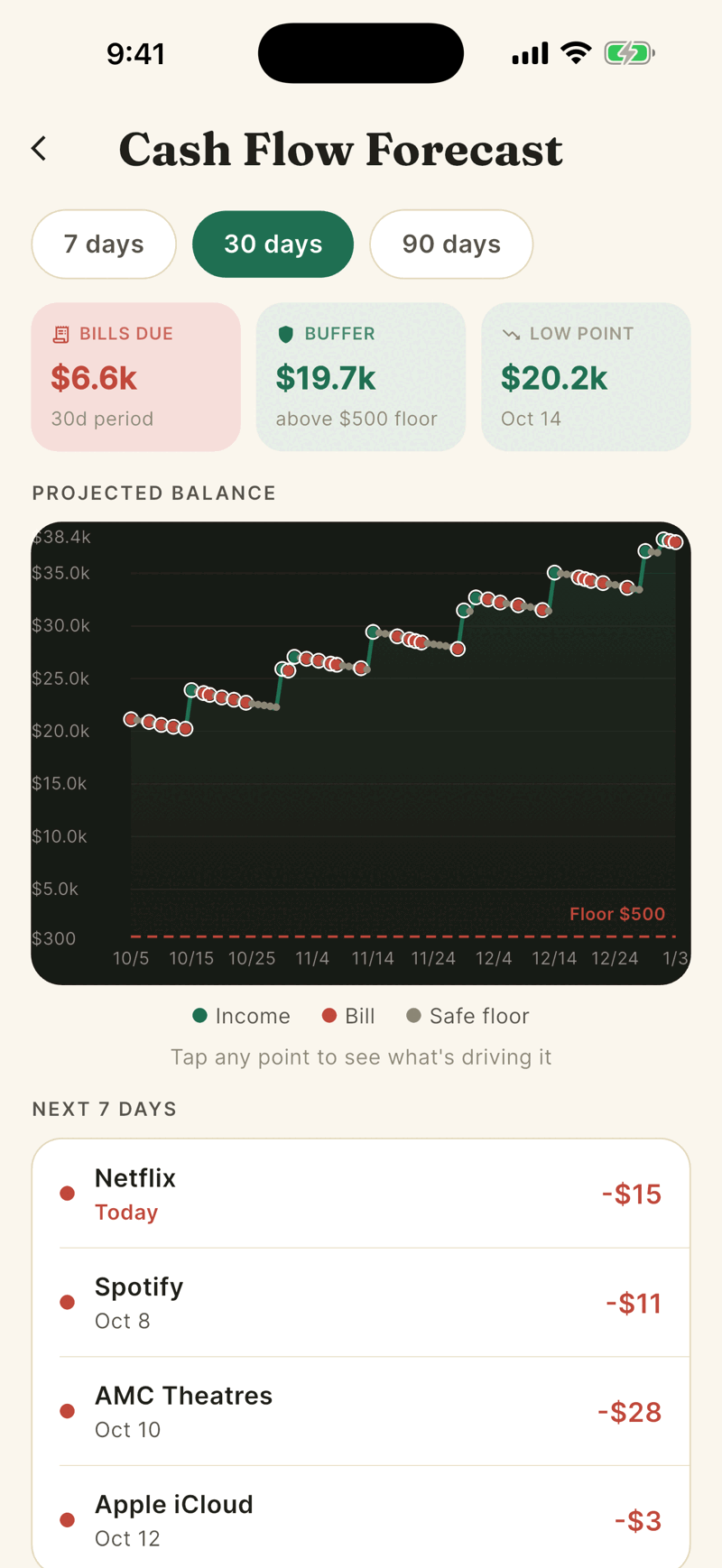
Read the three tiles: BILLS DUE in the period, BUFFER (lowest projected balance minus your safe floor, or SHORTFALL if below it) and LOW POINT with its date.
Tap any point on the chart to see what is driving that day.
How it is calculated
- It starts from today's balance of your household's checking and savings accounts. Credit cards, loans and investments are not included.
- Each day adds expected paychecks and subtracts expected bills and an estimate of everyday spending. Everyday spending is your last 30 days of spending divided by 30, adjusted up a little on Friday and Saturday.
- Bills and paychecks come from recurring patterns Shayr has detected.
- The safe floor is your household's cushion, the same one Safe to spend uses. It starts as about a week of your spending, never under $500 or over $5,000, and you can set your own amount from $0 to $25,000 in Safe to spend. On an older version of the app it is fixed at $500.
- Alerts show when the balance is projected to dip below your safe floor, in words such as Balance drops below $1,250 safety floor, or go negative.
Horizon by plan
| Plan | Days ahead |
|---|---|
| Free trial | 30 |
| Bussin | 30 |
| GOAT | 90 |
| A plan that has lapsed | 7 (the forecast is all that stays open) |
If a plan drops from GOAT to Bussin, the forecast goes back to 30 days at the end of the paid period. The Home card always says 30 days, even if your plan shows fewer.
If something goes wrong
The warning says No paycheck detected.
Without a detected paycheck the forecast only goes down. Keep your income account linked and wait for a few paychecks to repeat.
The forecast looks too gloomy.
It assumes you keep spending at your recent pace. A big one off purchase in the last 30 days raises that pace.
Was this helpful?YesNo, tell us what was missing