
Read the Plan screen
Plan puts three things for the current month on one screen: how much of your budget you have used, your savings goals, and your recurring bills. Tap See all on any card to open the full screen.
Steps
Tap Plan in the bottom bar.
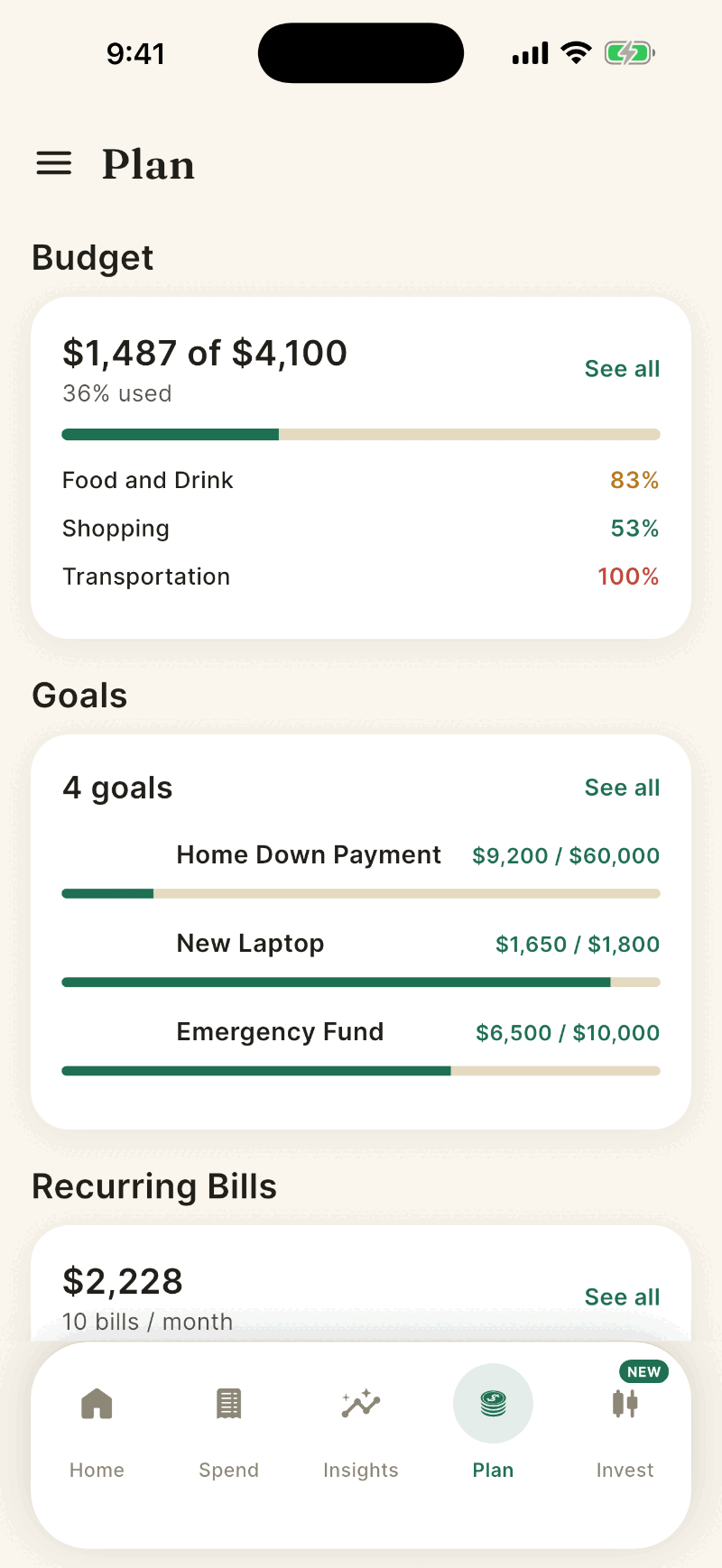
The Budget card shows spent against your total limit and the three categories using the most of theirs. Tap it to open Budget Planner.
The Goals card lists up to three goals with progress. Tap See all for Goals.
The Recurring Bills card shows a monthly total and the bills due soonest. Tap See all for Recurring.
How the numbers are worked out
- Budget total. Only categories with a budget count. Bar colors: green normally, amber at 80 percent, red when spending is over the limit.
- Recurring total. Each bill is converted to a monthly amount. A yearly bill counts as one twelfth, a weekly bill as 52 divided by 12 payments a month. Bills that vary, such as power, use their average.
- The screen always shows the current month. Pull down to refresh.
Budget, Goals and Recurring are opened from here. They are not in the menu.
Empty cards show a button to get started: Set up Budget, Add a Goal, or View Recurring.
If something goes wrong
The recurring card is empty.
Shayr needs about three charges from the same merchant before it treats them as a bill. Newly linked accounts may need a few weeks of history.
Numbers differ from Home.
Both read the same budgets. Pull down to refresh, and see Balance looks wrong if they still differ.
Was this helpful?YesNo, tell us what was missing